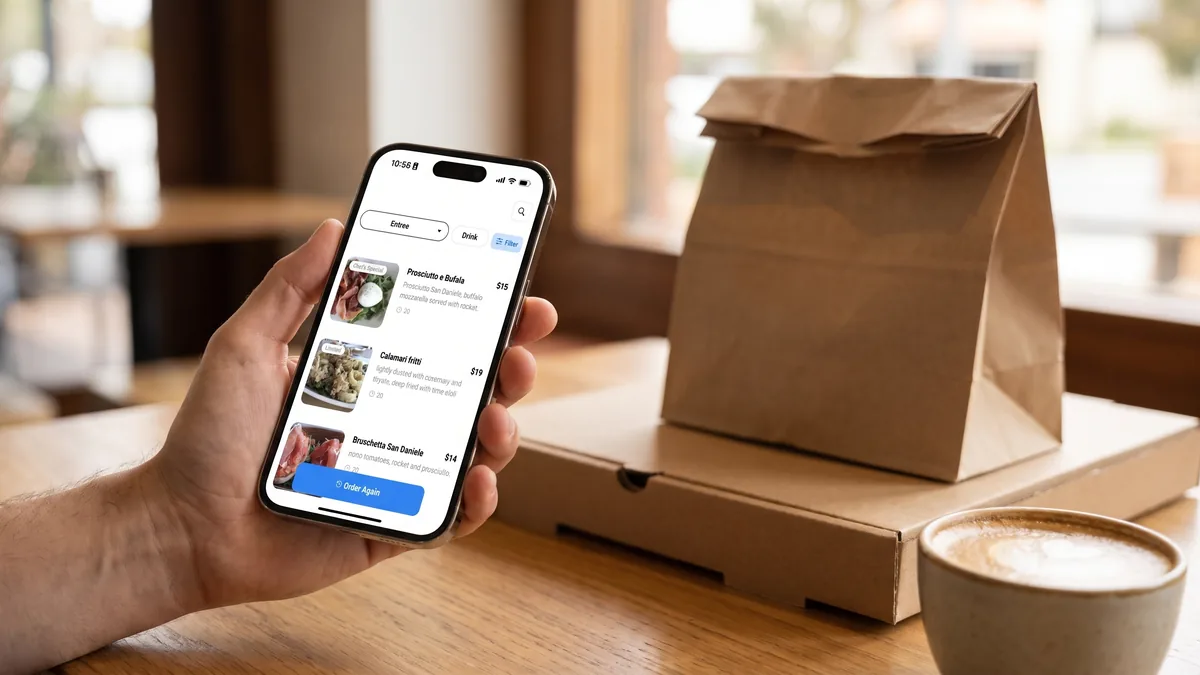
A direct ordering channel is your restaurant’s own online menu and ordering page, where customers order and pay you directly instead of through a marketplace like Uber Eats or DoorDash. Customers reach it by scanning a QR code or tapping a link on your website, your Instagram or your Google Business Profile.
Restaurants, takeaways, pizzerias and cafes should build one because it lets you keep more of each sale, hold your customers’ details yourself and bring people back on your terms. A marketplace order gives you far less of each. And you don’t have to leave the delivery apps to get them.
Last reviewed October 2026. Marketplace commission rates and fees change, so check each platform’s current merchant pricing before you compare.
What is a direct ordering channel?
It’s any way for customers to order straight from you: an online ordering page, a QR code menu on the table or at the counter, a pre-order link for pickup, or an “Order online” button on your Google Business Profile.
The difference from a marketplace is who sits in the middle. On a marketplace, the platform owns the checkout, the payment, the customer’s details and the relationship. On a direct channel, you do.
You don’t need a second kitchen or a second menu. Direct orders arrive through one more door and land on the same screen or printer as everything else. Each one usually costs you less than a marketplace order, and you end up with the customer’s name and number.
Why should a restaurant have a direct ordering channel?
1. Keep more of every sale
Delivery commissions on the big marketplaces commonly run from around 15% to 30% or more, depending on the platform and the plan, and pickup is usually charged at a lower rate. That comes off before you’ve paid for the food, the packaging or the wages.
Here’s an example with round numbers. On a $40 delivery order at 30% commission, the platform keeps $12 and you keep $28. If 20 orders a week at that size moved to your own channel, you’d keep about $240 a week you’d otherwise have paid away, which is roughly $12,000 over a year.
That’s before card processing fees and your ordering system’s own pricing, and it assumes those orders would have happened anyway and that you handle pickup or your own delivery. Both of those costs are normally well under a 30% commission, but include them when you work out your own saving. Your real starting number is on last month’s marketplace statement: divide the total fees by the total sales.
2. Own your customer data
A marketplace holds the customer’s details. You typically get an order ticket, a first name and a delivery address.
When someone orders direct, every order adds to a customer profile: who they are, what they order, how often they visit and when they last came in. That’s the difference between “a busy Friday” and knowing which of your regulars came in and who was new.
3. Win repeat orders without paying for visibility again
On a marketplace, repeat business is rented. Each time a customer comes back, they come back to the app, and the app largely decides whether they see your listing or a competitor’s.
With your own channel you can reward people directly. A free item after their fifth order, a coupon for a quiet Tuesday and a gift card at Christmas all work because you know who they are. You can also see who hasn’t ordered in a while and give them a reason to come back, as long as they’ve agreed to hear from you. Make that opt-in part of checkout, and check the rules for your market: the Spam Act in Australia, or CAN-SPAM and text-message consent rules in the US.
4. Control your menu, your brand and your wait times
Your menu, your photos, your wording. When the kitchen runs out of something, you mark it sold out and it disappears from the menu. On a slammed Friday the wait time customers see can follow how busy the kitchen actually is, instead of promising 20 minutes and apologising later. Drinks, sides and desserts sit right on the menu where customers see them as they order.
Customers see your brand when they order, not a row of competitors’ listings sitting next to yours.
5. Cut phone calls and order mistakes
Digital orders go to the kitchen exactly as the customer placed them. There’s no mishearing “no onion” over a noisy line, and fewer people get pulled off the pass to answer the phone. When an order is ready, the customer can get a message instead of ringing to ask.
Count the calls you take in one Friday rush. Each one pulls a cook or counter person off the job, and each mishearing is a remake you pay for.
6. Depend less on delivery apps
Commission rates, search ranking, promotions and delivery zones are all set by the platform, and they can change at any time without your say. If one does, you still have a menu people can order from and a list of customers you can tell. A venue that trades only on the apps has neither.
Direct ordering for different kinds of venue
Direct ordering for restaurants
For a sit-down restaurant, direct ordering covers more than takeaway. A QR code at the table lets guests order another round without flagging a waiter. The same menu handles pickup and delivery, and the customer profile follows the guest from dine-in to takeaway. If you add your ordering link to your website and Google Business Profile, people who find you on Google can order from your own page instead of a marketplace.
Online ordering for takeaways and takeout shops
Takeaways often have a lot to gain. They pay the most in commission and lose the most to the phone. As more orders come in digitally, the phone pulls your cook off the food less often, because nobody has to take down an address over the noise of a fryer. Our guide on killing phone-order interruptions shows how.
A QR code on the bag, the receipt or a flyer can move marketplace customers onto your own page for their next order. They’ve already decided they like your food, and the second order is the one worth winning. Check your marketplace agreement for any rules on inserts and off-platform promotion.
Online ordering for pizzerias
Half-and-half, extra jalapenos, no cheese on one side: those are the orders that get garbled over the phone. On a menu with modifiers, each choice is a tap, and the ticket reaches the oven exactly as built. When the oven is backed up, you can quote 40 minutes up front instead of promising 20, and regulars can re-order their usual in a couple of taps. See how pizzerias handle custom builds without kitchen chaos.
Pre-ordering for cafes
For cafes the value is the morning rush and the regulars. People pre-order on the way in and get a message when the coffee is ready, so the queue builds up less at the counter. Loyalty runs through the order itself, so there are no paper stamp cards to lose, and a regular who orders from the table doesn’t have to line up again.
Direct ordering vs Uber Eats and DoorDash
Direct ordering is a practical Uber Eats alternative for customers who already know you. It costs a card processing fee per order plus your system’s pricing, while delivery marketplaces charge a commission on every order but bring you new customers. This is how they compare.
| Compared on | Direct ordering channel | Delivery marketplaces (Uber Eats, DoorDash) |
|---|---|---|
| Cost per order | Card processing fees, plus your system’s pricing | Commission on every order, commonly 15–30% or more on delivery, often lower on pickup |
| Customer details | Yours: name, contact, order history | Mostly held by the platform |
| Repeat marketing | You can reward customers and give lapsed ones a reason to return | Visibility often depends on ranking and paid promotions |
| Brand and menu control | Your brand and your menu, with sides and drinks right there | The platform’s layout, with competitors alongside |
| Finding new customers | Depends on your own marketing, Google and social | Strong, thanks to a built-in audience |
| Delivery | Pickup and dine-in, your own drivers, or drivers hired by the hour through a third-party service where available | The platform’s rider network |
Marketplaces are strong at discovery: being found by people who have never heard of you. Keep them for that, and use your own channel to win the second order.
Delivery is the part owners worry about, and you don’t have to solve it on day one. Start with pickup and dine-in orders, which carry no delivery cost, and add delivery with your own driver, or one hired by the hour, once direct volume justifies it.
How to build a direct ordering channel in six steps
- Choose a system that does the whole job. You want menu, ordering, payment, kitchen routing and customer profiles in one place. A standalone order form that emails you a list isn’t enough. Most of the setup is loading your menu: items, prices, photos and modifiers. A short menu is quick and a large one with no photos takes longer, so ask whether the provider loads it for you. Place a test order from your own phone and walk the team through it before you tell a single customer.
- Put QR codes where customers are already holding your food. Start with the bag, the receipt and the counter, then add tables, the window and flyers. Put the link on your website, your Instagram bio and the “Order online” link on your Google Business Profile. Then ask your team to say one line when they hand over an order: “Next time, scan this and order direct.”
- Make it faster than the marketplace app. The menu should open in a couple of taps, with no app to download and fast payment with Apple Pay or Google Pay at checkout. If it’s slower than the app on their home screen, they’ll use the app.
- Give people a reason to switch, and keep it smaller than the commission you’re avoiding. A 10% discount on a $40 order costs you $4, against $12 in commission at 30%. A free side or a direct-only reward works just as well.
- Capture the customer on the first order. A good system builds the profile automatically from the order, so there’s nothing extra for staff to do.
- Bring them back, and track it. Reward regulars and ask for a review while the experience is still fresh. Each month, work out your direct share: direct orders divided by all online orders. If that number is rising while your marketplace listings keep sending new customers, the channel is working. A loyalty program people actually use helps it climb.
If you’re moving orders off the apps specifically, our 90-day plan for reducing delivery fees shows the steps.
What should a restaurant online ordering system include?
A good restaurant online ordering system lets customers order and pay from their own phone, sends the order straight to the kitchen and records who ordered. Check for these:
- Orders reach the kitchen directly, on a screen or a printer, with no re-keying.
- Payment happens at the time of order, including card, Apple Pay and Google Pay.
- Customer profiles, loyalty and coupons are built in, not bolted on from another tool.
- You can see and use your customer data, meaning names, contact details and order history, not just a sales total.
- One menu serves dine-in, pickup and delivery, so you’re not maintaining three.
- Pricing you understand. Ask for the full cost per order, including the monthly fee, any per-order fee and card processing fees, and compare it with what the marketplaces take from you.
- A plan for when the internet drops. A cloud-based system needs a connection, so keep a phone hotspot or portable 4G/5G router as a backup.
How Asky helps
Asky is a hospitality platform that gives restaurants, takeaways, pizzerias and cafes a direct ordering channel without making you give up the marketplaces. Customers scan a QR code or open your link and see a digital menu with photos, modifiers, dietary tags and prep times. They order and pay on their own phone, and the order lands on your kitchen screen or printer.
Customers get a message when their order is ready, and every order adds to a customer profile that loyalty, coupons and gift cards draw on. Asky runs over the internet, so keep a phone hotspot as a backup, and it sits alongside your marketplace listings rather than replacing them. Pricing is tailored to your venue and shared after a quote.
Frequently asked questions
What is a direct ordering channel for a restaurant?
It’s your own way for customers to order and pay without a third-party marketplace: an online ordering page, a QR code menu, or a pre-order link. The order, the payment and the customer’s details come straight to you.
Is direct ordering cheaper than Uber Eats or DoorDash?
Often, yes. Marketplaces typically charge a commission of roughly 15–30% or more on delivery orders. A direct order carries card processing fees and the cost of your ordering system, which together are usually lower than a marketplace commission. The exact saving depends on your volume and the plans involved.
Is there an Uber Eats alternative for restaurants?
Yes. A direct ordering channel is the practical alternative for repeat customers: they order and pay through your own menu, and you keep their details. Many venues keep their marketplace listings for discovery and move their regulars to the direct channel.
Can I offer delivery without Uber Eats or DoorDash?
Yes. A direct channel can run dine-in, pickup and delivery from one menu. Delivery is handled by your own drivers, or by drivers you hire by the hour through a third-party service where one is available in your area. Many venues start with pickup and add delivery later.
Do I have to stop using delivery apps to build a direct channel?
No. Many venues keep the apps for discovery and use their own channel to turn those customers into regulars. How fast direct orders grow depends on how hard you push the QR codes and the perk. The 90-day plan linked above treats it as a three-month job.
How do I get customers to order direct instead of through an app?
Make direct the easiest option and give a small reason to choose it. Put QR codes on bags, receipts and tables, keep the menu fast with no app to download, and offer a direct-only perk such as a free side or a loyalty stamp.
Does a cafe need a direct ordering channel?
If you have a morning queue or a base of regulars, yes. Pre-ordering can shorten the queue, ready-for-pickup messages keep people off the counter, and loyalty built into every order helps you keep regulars coming back.
How much does a restaurant online ordering system cost?
It varies by provider. Some charge a monthly fee, some take a per-order commission, and some do both. To compare fairly, add up the monthly fee, any per-order fees and card processing fees, divide by the direct orders you expect each month, and compare that cost per order with the commission you pay on marketplace orders. Asky’s pricing is tailored to your venue and shared after a quote.
How long does it take to set up a direct ordering channel?
Mostly it’s the time it takes to load your menu: items, prices, photos and modifiers. A short menu is quick, and a large one with no photos takes longer. Ask your provider for a timeline and whether they load the menu for you, then place a test order before you tell customers.